
Summarize this article with
To reduce cart abandonment, show the full price early, offer guest checkout, cut checkout fields, and email customers who leave. About 70% of online carts are abandoned: Baymard Institute's September 2025 average across 50 studies is 70.22%. The most common reason is extra costs at checkout, named by 40% of people who abandoned a checkout in Baymard's survey. This guide ranks eight fixes for Shopify and WooCommerce stores.
What counts as an abandoned cart?
An abandoned cart is a cart with products in it that the customer leaves without paying. The rate is abandoned carts divided by carts created. Platforms count slightly differently. Shopify counts a checkout as abandoned when it stays incomplete for more than ten minutes after the customer enters an email.
Baymard Institute lists 50 studies on its cart abandonment rate page and averages them at 70.22% (updated September 22, 2025). Treat that as a rough guide. Your rate depends on your products, price, and traffic, and your own trend tells you more than any average.
Know what your platform counts before you read your numbers. Shopify's list starts at the moment a customer gives an email, so it does not show every cart. Shopify also warns that some abandoned checkouts might still come from bots, because not all automated activity is filtered out. Expect your real rate to differ from a platform report.
Why do customers leave without paying?
Mostly for reasons you can see and fix. Baymard's list gives the share of respondents who named each reason when they abandoned a cart.
| Reason given | Share who named it | Fix in this guide |
|---|---|---|
| Extra costs too high (shipping, tax, fees) | 40% | 1 |
| Delivery was too slow | 20% | 2 |
| Did not trust the site with card information | 19% | 3 |
| The site wanted me to create an account | 18% | 4 |
| Too long or complicated checkout | 17% | 5 |
| Website had errors or crashed | 17% | 6 |
| Returns policy was not satisfactory | 13% | 3 |
| Could not see the total order cost up front | 12% | 1 |
Source: Baymard Institute, 50 Cart Abandonment Rate Statistics, updated September 22, 2025. The shares add up to more than 100% because respondents gave more than one reason.
The table leaves out a bigger group. In Baymard's latest US survey of reasons, 42% of the people surveyed had abandoned a cart because they were just browsing or not ready to buy. Those carts were never going to convert, so do not count them as lost sales.
Which fixes should you do first?
Start with the fixes that match the biggest causes. The table ranks the eight fixes by the share of respondents who named the cause they address. That is a ranking by size of the problem. No source we found measures the sales lift of each fix, so treat the order as a place to start and test your own store.
| Rank | Fix | Cause it addresses | Cost | Effort |
|---|---|---|---|---|
| 1 | Show the full cost early | Extra costs (40%), hidden total (12%) | Free | A few hours |
| 2 | State delivery times | Slow delivery (20%) | Free | An hour |
| 3 | Build trust at payment | Trust (19%), returns (13%) | Free | A few hours |
| 4 | Allow guest checkout | Forced account (18%) | Free | 5 minutes |
| 5 | Cut checkout fields | Complicated checkout (17%) | Free | 15 minutes |
| 6 | Test for errors on a phone | Errors (17%) | Free | An hour |
| 7 | Send recovery emails | Customers who already left | Free on Shopify, a plugin or tool on WooCommerce | An hour |
| 8 | Test an exit-intent offer | Customers about to leave | Depends on the tool | A few hours |
How do you fix each cause?
1. Show the full cost early
Extra costs are the top reason in Baymard's list, and 12% could not see the total up front. Show shipping, tax, and fees before the checkout page.
- Put a shipping estimate or a free-shipping threshold on the product and cart pages.
- Say whether prices include tax.
- Do not add a handling fee at the last step.
2. State delivery times
Slow delivery was named by 20%. Put a delivery window on the product page, for example "Arrives in 3-5 days". If you cannot ship fast, say so early and offer a faster paid option.
3. Build trust at payment
Nineteen percent did not trust the site with their card details, and 13% disliked the returns policy. Show the payment methods you accept near the checkout button. Link your returns policy from the cart. Real reviews and customer photos also help, as in our guide to social proof for online stores.
Nine percent said there were not enough payment methods, and 10% had a card declined. Offer at least one wallet or local method your customers use.
4. Allow guest checkout
Eighteen percent left because the site wanted an account. Baymard's form-field research found that 84% of sites do not offer account creation on the order confirmation step. Let customers pay first and offer an account afterwards.
Shopify
- Go to Settings > Checkout.
- In Customer contact method, leave Require customers to sign in to their account before checkout unchecked.
Shopify's checkout form options page lists this setting.
WooCommerce
- Go to WooCommerce > Settings > Accounts & Privacy.
- Under Checkout, check Enable guest checkout.
- Under Account creation, check After checkout to offer an account once the order is placed.
- Click Save changes.
WooCommerce's Accounts and Privacy documentation describes both options.
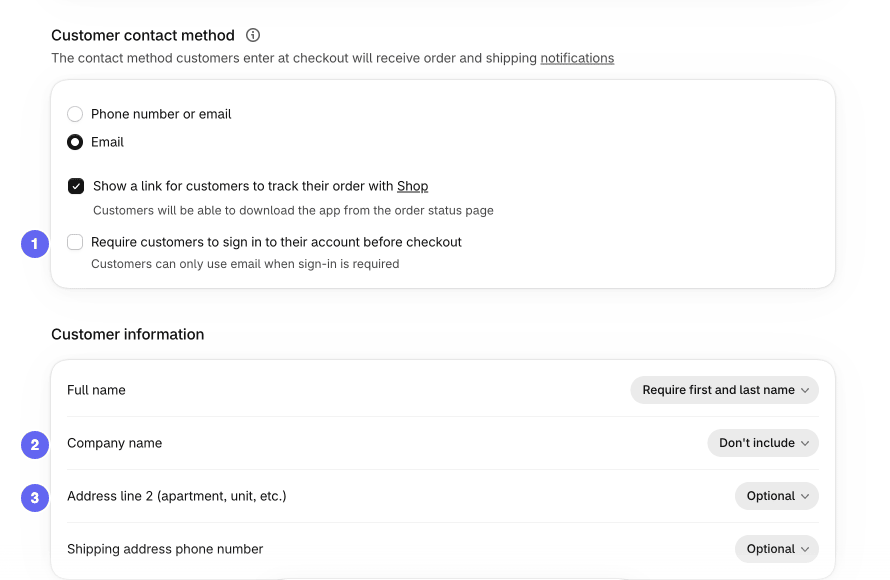
Leave the sign-in requirement off and hide the fields your orders do not need.
5. Cut checkout fields
Baymard found the average checkout had 11.3 form fields in 2024 and says most sites need only 8. In its tests, 30% of participants stopped at the Address Line 2 field. Remove every field you do not use to ship or contact the customer.
Shopify: on the same Settings > Checkout page, go to Customer information. Set Company name to Don't include unless you sell to businesses. Leave Address line 2 (apartment, unit, etc.) on Optional: Shopify warns that hiding it can block customers who live in apartments. Keep Shipping address phone number on Optional unless your courier needs it.
WooCommerce: open your Checkout page in the block editor. Inside the Checkout block, click the Shipping Address block. The Address Fields panel then appears in the sidebar, with toggles for the Company, Address line 2, and Phone fields. Visible fields can be Optional or Required. The Checkout block documentation covers these settings.
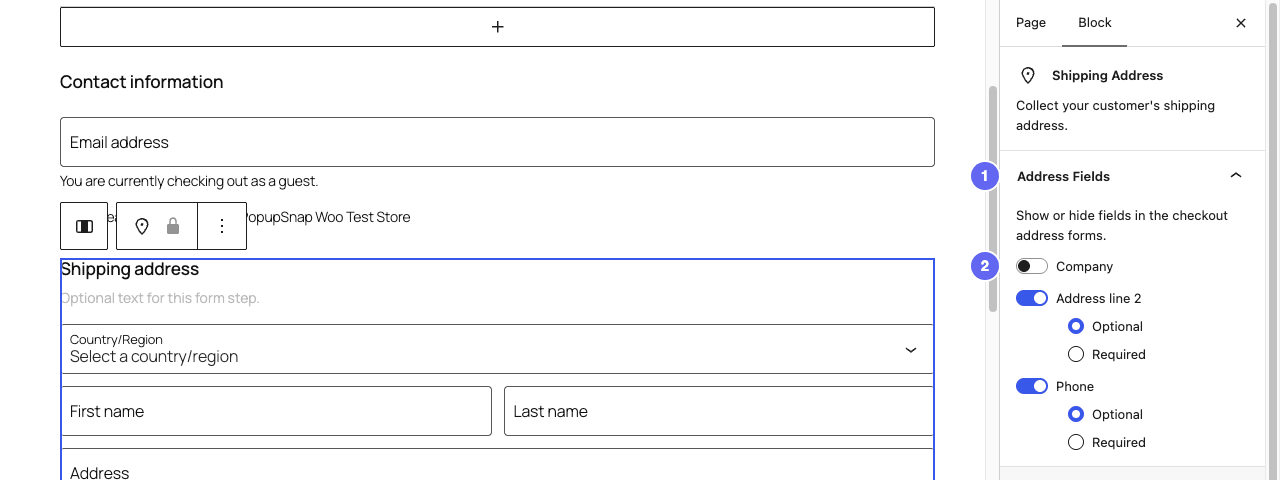
Select the Shipping Address block inside the Checkout block to see the Address Fields toggles.
6. Test for errors on a phone
Seventeen percent named errors or crashes. Place a real test order on a phone, on mobile data, with a payment method you offer. Note every step that is slow, hidden, or confusing. Fix what breaks before you tune anything else.
- Add a product to the cart, change its quantity, and remove it.
- Apply a discount code and check that the total updates.
- Pay with each method you offer, including a wallet.
- Try an address with a long street name or an apartment number.
Repeat the test after you install any new app or plugin, because a new script can break a page that worked yesterday.
7. Send recovery emails
A recovery email does not remove a cause. It brings back customers who left. The email only works if the customer gave you an address before leaving, so it pays to grow your email list first.
Shopify
- Go to Settings > Checkout, then scroll to Abandoned checkout emails.
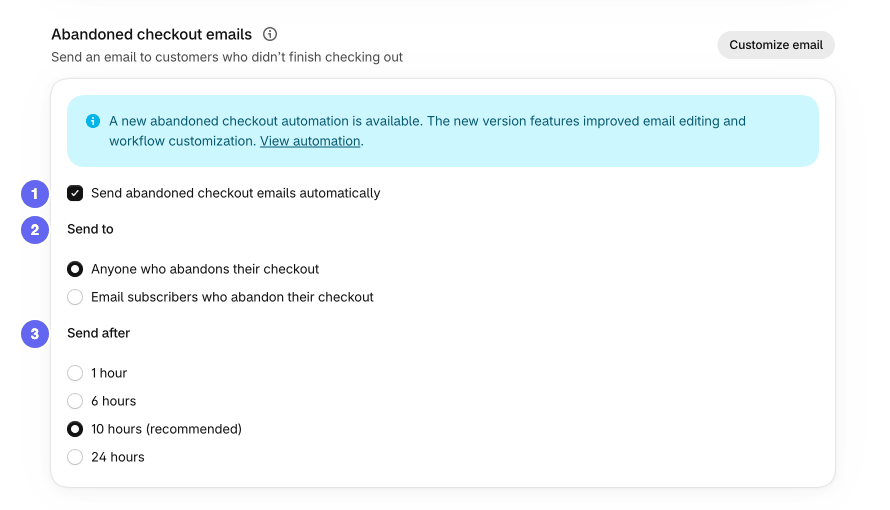
- Select Send abandoned checkout emails automatically.
- In Send to, choose Anyone who abandons their checkout or Email subscribers who abandon their checkout.
- In Send after, choose 1 hour, 6 hours, 10 hours or 24 hours. Shopify marks 10 hours as recommended.
- Click Save. To edit the text, click Customize email at the top of the section.
The same section shows a banner about a new abandoned checkout automation, with better email editing and workflow options. Shopify's abandoned checkouts page suggests that automation in the Shopify Messaging app if you want more control.
To see results, go to Orders > Abandoned checkouts. On a new store the page is empty. Once customers leave checkouts, the list adds Email status and Recovery status columns. After an email is sent, Shopify counts the checkout as recovered once the customer completes the order, whether they click the link or finish on their own.
You can also email a customer a link to their abandoned checkout by hand. Send it only to that customer, because anyone with the link can continue the checkout. Shopify's help page lists these steps.
Orders > Abandoned checkouts stays empty until a customer leaves a checkout after entering an email.
WooCommerce: WooCommerce 11.0 and 11.1 shipped an experimental recovery email, off by default. WooCommerce's documentation says it was removed in 11.2. For recovery emails on 11.2 or later, use a marketing tool such as AutomateWoo or MailPoet, which that page names for multi-step campaigns.
Keep the first email a plain reminder with the product name and a link back. Add a discount only to a later email, so customers do not learn to wait for one.
Check the rules before you send. Under the UK's PECR regulation 22, marketing email needs consent unless you collected the address during a sale or sales negotiation and meet the other conditions. In the US, the FTC's CAN-SPAM guide requires an opt-out and a postal address in marketing email. On Shopify, if you send abandoned cart reminders, the contact collection page says to change the text next to the checkout consent checkbox. Rules differ by country, so check yours.
8. Test an exit-intent offer
An exit-intent popup shows a message when a visitor moves to leave. For a cart, it can offer to save the cart by email or answer a delivery question. No source we found shows how much it recovers, so run it as a test with a clear start and end date. Our guide to exit-intent popups covers the trigger and timing.
Keep it small. Google's guidance says not to obscure the entire page with interstitials and recommends banners that take up only a small fraction of the screen.
How do you know a fix worked?
Change one thing, then wait a few weeks before the next. Track your abandonment rate and your recovered checkouts for the same period before and after. On Shopify, the Recovery status column in Abandoned checkouts shows what the emails win back, once the list has checkouts in it. On WooCommerce, use your email tool's report.
Compare results with your own history first. Then use the average e-commerce conversion rate benchmarks as a rough check.
Frequently asked questions
What is a good cart abandonment rate?
There is no target rate, because it varies by industry, device, and price. Baymard Institute's September 2025 average across 50 studies is 70.22%, so a rate near 70% is typical. Its latest US survey of reasons also found that 42% of people who left were only browsing. Track your own rate over time instead of chasing a benchmark.
How soon should you send an abandoned cart email?
No source we found gives a best delay, so test it. In Shopify, the Send after setting in Settings > Checkout controls the wait, from 1 to 24 hours. Try one delay for a few weeks, then compare the Recovery status column in Abandoned checkouts. Change one thing at a time, and keep the first email a plain reminder before you add a discount.
Is it legal to email people who abandoned a cart?
It depends on your country and on what the email says. In the US, the FTC's CAN-SPAM guide requires a working opt-out and your postal address in every marketing email. Under the UK's PECR, marketing email needs consent or must meet every soft opt-in condition, including that you collected the address during a sale or sales negotiation. Whether an abandoned cart counts is a question for a lawyer.
Does Shopify save an abandoned cart?
No. Shopify's help page says items in the cart are not saved after a checkout is abandoned. It counts a checkout as abandoned when it stays incomplete for more than ten minutes after the customer enters an email. Abandoned checkouts older than three months are deleted, and recovery works only for the Online Store and Buy Button channels.
Check your rate against a benchmark
Once you change one thing, compare your results with real benchmarks. Our guide to the average e-commerce conversion rate names who measured each number, the period and the sample.


