
Summarize this article with
To grow an email list, offer something worth an address, show a simple signup form at the right moment, and collect consent properly. On Shopify, that means a form in Klaviyo or Shopify Forms. On WooCommerce, it means Mailchimp's plugin and its popup form. This guide gives six steps and a consent table for the US, the UK, and the EU.
Step 1: What do you need before you start?
You need three things: an email tool, an offer, and a consent plan. Start with a tool that stores each address with its consent status. Klaviyo and Mailchimp both do this, and Shopify has its own signup forms. The offer is the reason to join. The consent plan is the rule set for your customers' countries.
Shopify's help center says to send promotional content only to customers who agreed to receive marketing. Treat that as the starting rule on any platform.
Step 2: What should you offer?
Offer something your visitors want before they buy. Typical offers are a first-order discount, a giveaway entry, or early access to new products. Klaviyo's help center suggests adding a coupon block to the form's success step to encourage visitors to sign up and then buy.
No source we found measures how much a discount lifts signups, so test it. Margin matters too. A discount that costs more than a new customer is worth will not pay back.
How do you limit a first-order discount to new customers?
Shopify
- Go to Discounts and create a discount code.
- Under customer eligibility, choose Customer segments.
- Pick a segment built with
number_of_orders = 0, then click Add.
Shopify's discount management page says this targets customers who have not purchased before, identified at checkout by a valid email address or phone number.
WooCommerce
- Go to WooCommerce > Settings > General and turn on coupons, if they are off.
- Go to Marketing > Coupons and click Add new coupon.
- Under usage limits, set Usage limit per user to 1.
WooCommerce's coupon documentation describes this setting. It also describes Allowed emails, which checks the code against the customer's billing email.
Step 3: How do you set up the signup form?
Keep the form to one field if you can. Klaviyo's guide says that packing too much into one form makes it harder for a visitor to say yes. Ask for an email address first. You can ask for more after someone has joined. For ideas on wording and layout, see our email popup examples.
How do you set it up on Shopify with Klaviyo?
-
Connect your store to Klaviyo and check that sign-up forms are enabled. Klaviyo's guide covers this under Before you begin.
-
Create the list the form will fill.
-
In Klaviyo, go to Website > Sign-up forms and click Create form.
-
If asked for a channel, enter a name, select Web, and click Create form.
-
Pick a template, name the form, and choose your list.
-
Click Create form to open the editor, then edit the text and design.
-
Add a coupon block to the success step if you offer a discount.
If you prefer Shopify's own tool, use Shopify Forms. Turn on the Forms toggle under App embeds in your theme editor, then go to Apps > Forms and click Create form. Choose Popup form. Shopify's Forms guide says a form shows only after you activate it, and that forms do not support multi-step flows or conditional logic.
How do you set it up on WooCommerce with Mailchimp?
- Go to Plugins > Add New, search for Mailchimp, and pick the Mailchimp for WooCommerce card. Click Install Now, then Activate.
- Open the plugin's settings and click Connect Account. Log in and click Allow.
- Pick the Linked audience that will receive your subscribers.
- Choose how to import your existing customers, then click Sync now.
- In Mailchimp, go to Integrations > Manage > WooCommerce. Under Integration settings, create or manage your popup form.
Mailchimp's WooCommerce connection guide lists these steps and says popup forms need plugin version 2.1.10 or later.
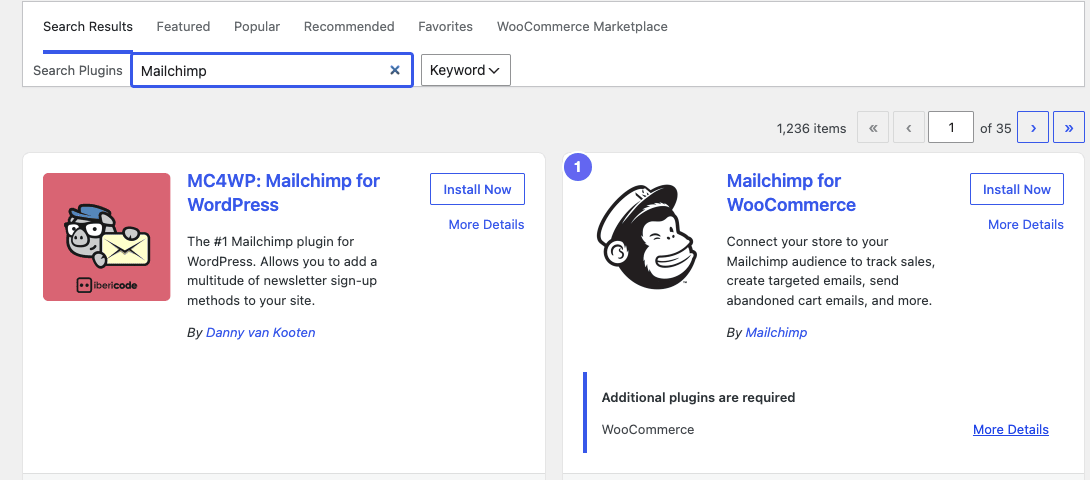
Pick the Mailchimp for WooCommerce card by Mailchimp, not MC4WP, then install and activate it.
Read the import options before you click. Sync as subscribed imports all your customers as subscribed contacts, whether or not each one agreed to marketing. Choose it only if they did. If you are unsure, choose Sync as non-subscribed.
Step 4: When should the form appear?
Show the form at a calm moment, and do not show it again right after someone closes it. Klaviyo's basic setup is a popup that shows when a visitor is exiting the page. Its guide then sets the form to show again only after 5 days if closed, and never after a visitor submits it. It also uses Don't show to existing Klaviyo profiles, so current subscribers do not see it.
Our guide to exit-intent popups explains the trigger and its limits on phones.
Keep the popup small. Google says not to obscure the entire page with interstitials and recommends banners that take up only a small fraction of the screen.
Step 5: What does consent require?
The rules depend on where your customers live. Check the country of each customer, not only your own. The table summarizes three sets of rules in plain terms, and none of it is legal advice.
| Place | What the source says | Source |
|---|---|---|
| United States | No prior consent rule in the FTC's list. Each marketing email needs an accurate sender and subject line, an ad disclosure, a postal address, and an opt-out honored within 10 business days | FTC CAN-SPAM guide, 2024 |
| United Kingdom | Marketing email needs prior consent, unless you got the address during a sale, market only similar products, and offer a simple way to refuse | PECR regulation 22 |
| EU | Marketing email needs prior consent, with a similar exception for existing customers. Consent is a clear affirmative act. Pre-ticked boxes do not count. Withdrawing must be as easy as giving consent | ePrivacy Directive Article 13; GDPR Recital 32 and Article 7 |
The FTC's CAN-SPAM guide says each email that breaks its rules can cost up to $53,088 in penalties. In the UK, PECR regulation 22 sets the consent rule. In the EU, Article 13 of the ePrivacy Directive sets it, and each country applies it in its own law. The GDPR defines valid consent: Recital 32 says silence and pre-ticked boxes are not consent, and Article 7 says withdrawing must be as easy as giving it.
What about double opt-in?
Double opt-in sends a confirmation email, and the person joins only after clicking the link. Klaviyo sets it per list, and Mailchimp sets it per audience. On Shopify, go to Settings > Notifications > Customer notifications. In the Marketing double opt-in section, switch on the Customer marketing confirmation toggle, which is off by default. Shopify then emails new subscribers so they can confirm.
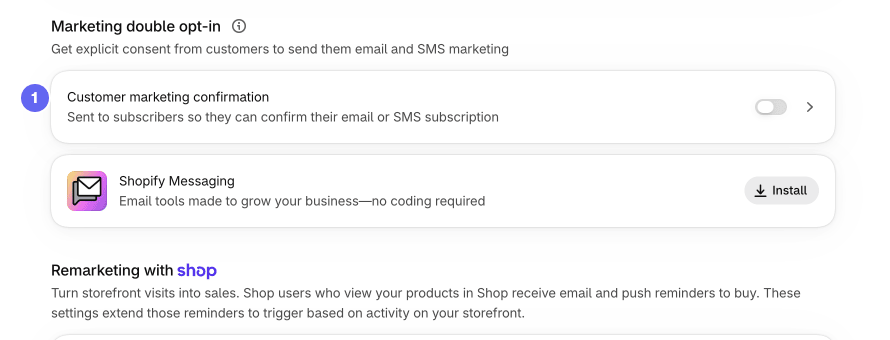
Switch on Customer marketing confirmation to send new subscribers a confirmation email. It is off by default.
Shopify's contact collection page says double opt-in is required by law in some countries. It also says that, for legal reasons, the confirmation email should not contain any marketing. If you turn it on, update your form's success message so people know to check their inbox.
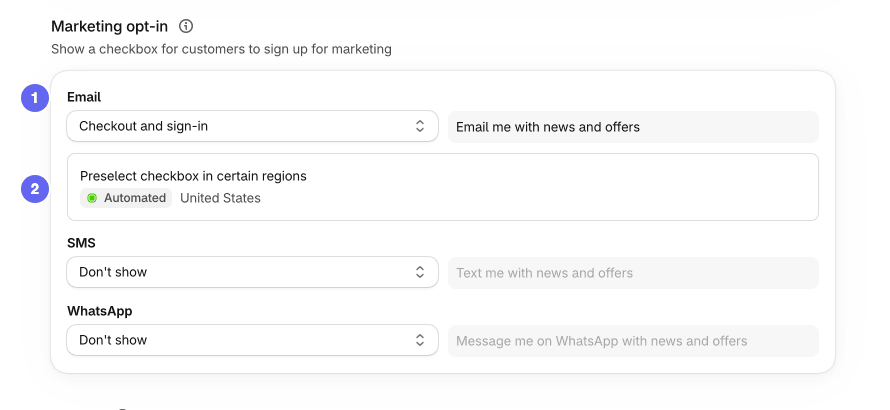
The Email dropdown turns on the consent checkbox, and the preselect setting decides where it starts ticked.
In Settings > Checkout, the Marketing opt-in section has an Email dropdown. Set it to Checkout and sign-in to show a consent checkbox labeled "Email me with news and offers". Below it, Preselect checkbox in certain regions decides where the box starts ticked.
On our test store it read Automated, with the United States listed. Shopify's help page says you can let it decide by region or pick the regions yourself. Leaving it unchecked everywhere is the safer choice under the GDPR text above.
Step 6: How do you measure it?
Track three numbers for a few weeks: how many visitors see the form, how many sign up, and how many of those buy. Your email tool reports the first two. Compare orders from subscribers with your overall results, and with the average e-commerce conversion rate benchmarks for context.
Change one thing at a time, such as the offer or the timing, so you know what moved the numbers. Our guide to how to reduce cart abandonment covers the next email to set up, the reminder for customers who leave without paying.
Klaviyo's sign-up forms guide says it turns on CAPTCHA for forms that collect emails. If your list suddenly fills with fake addresses, that is a reason to check your tool's bot settings.
Frequently asked questions
How many email subscribers do you need to start?
There is no minimum. No source we found sets a threshold, and both Klaviyo and Mailchimp let you send to a small list. Start collecting from day one with one simple form, then judge it by your own signup rate and sales over several weeks. A small list of people who asked to hear from you beats a large one built without consent.
Is a first order discount worth offering?
It depends on your margins, and no source we found measures how much it lifts signups. Klaviyo's help center suggests adding a coupon block to the form's success step to encourage signups and purchases. Run it as a test for a few weeks, then compare signups and order value with a period without it.
Do you need double opt-in?
Not everywhere, but some countries require it. Shopify's help center says double opt-in is required by law in some countries and is a good practice anyway, because it builds a list of engaged subscribers. Klaviyo turns it on per list and Mailchimp per audience. If you sell to the EU or the UK, ask a lawyer which setup you need before you send.
Can you email customers who bought but never subscribed?
It depends on where the customer lives. In the UK and the EU, you may email past customers about similar products. You must have offered a simple way to refuse when you collected the address, and in every message since. In the US, the FTC's CAN-SPAM guide lists no prior consent requirement, but every marketing email needs a working opt-out. A receipt is not marketing, so different rules apply to it.
Check your results against a benchmark
After a few weeks, compare your signup rate and your sales with real numbers. Our guide to the average e-commerce conversion rate names who measured each number, the period and the sample.


