Uninstall, your data and privacy requests on Shopify
This article explains what Lucky Wheel keeps for your Shopify store, how you answer a customer's data request, and what happens when you uninstall. The full details are in the Lucky Wheel on Shopify section of our privacy policy.
When to use this article
- A customer asked your store for their data, or asked you to delete it.
- You plan to uninstall the app and want to know what happens.
What the app can see in your store
The app asks Shopify for three permissions: discount codes, customers, and the app address on your store (/apps/luckywheel). It does not ask for your orders, products or theme files.
The customers permission is there for saving shoppers as customers in your store. That is off at launch: it needs Shopify to approve protected customer data (email and phone) for the app, and that is not approved yet. See What stays in your Shopify store.
What the app keeps
- Your store address, your plan, your wheel settings and the codes it created.
- How many times your wheel opened, counted per hour, with no shopper details.
- From shoppers: the email and phone number they typed (if you ask for them), their marketing ticks, and their spin result, prize and code.
Shoppers' emails and phone numbers are stored encrypted.
See and export your shoppers' details
You can see the shoppers who entered your wheel on the Leads page in the app, search for one by a whole email address or phone number, and export the list as a CSV file. See See and export your leads on Shopify. We never keep the CSV on our servers.
Every time you open the Leads page or export the list, the app writes an entry in the access log: the date, your store, your Shopify user and how many leads it held. The log holds no shopper details.
How long it keeps it
| Data | Kept for |
|---|---|
| Spins and shopper details (what the Leads page and the CSV show) | 24 months from the date each one was captured. After that, they no longer show on the Leads page or in the export, and the same shopper can spin again. |
| Hourly view counts | 400 days |
| The record of a privacy request | 90 days |
| The file for a data request | 7 days |
| Your store's data after you uninstall | 48 hours |
Answer a customer data request
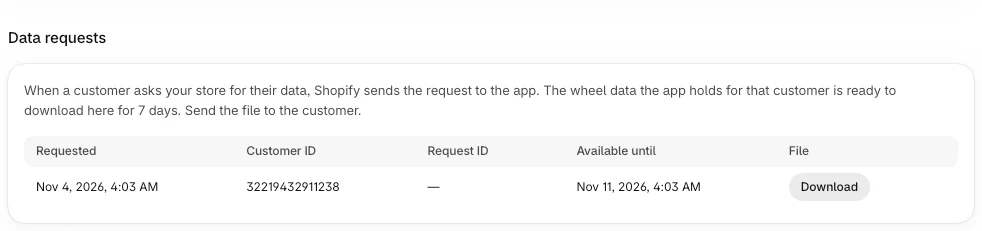
When a customer asks your store for their data, Shopify sends the request to the app. The app prepares a file with the wheel data it holds for that customer.
- Open the app's Home page.
- Go to Data requests.
- Find the request by Requested and Customer ID.
- Click Download and send the file to the customer.
Request ID shows a dash (—) when Shopify sends the request without an ID, which is what happens when you send it from a customer's page in your Shopify admin. The file is then named data-request-export- followed by a number. Use the date and the customer ID to find it.
The file can be downloaded until the date in Available until, 7 days after the request.
Each download is recorded in an access log: the date, your store, your Shopify user, which file, and how many records it held. Opening the Leads page and exporting the leads are logged the same way. The log holds no shopper details and the app does not show it to you.
Our own staff are logged too. No screen shows your shoppers' details to our staff. Reading them takes a command on our server that first records who, which store and why.
Delete a customer's data
When you ask Shopify to erase a customer's data, Shopify tells the app. The app deletes that customer's spins and shopper details, and any data request file made for them. You do not need to do anything in the app.
If a request does not find the customer
A request can miss a shopper who used the wheel as a guest, or who typed a different email or phone number from the one Shopify has. Email [email protected] with the details you have and we will search for them.
What stays in your Shopify store
At launch, the app saves nothing in your Shopify customers. Saving shoppers as customers is off. It needs Shopify to approve protected customer data (email and phone) for the app, and that is not approved yet. Until it is on, shoppers' emails and phone numbers stay in Lucky Wheel only, and the app does not create customers, add tags or write metafields.
When it is turned on: when a shopper enters an email or phone number, the app saves them as a customer in your store. When they win, it adds the tag lucky-wheel-winner and saves the prize, the code and its end date in the customer's lucky_wheel metafields. These stay in your Shopify store. The app's deletions and uninstalling do not remove them.
When you uninstall
- The wheel stops showing on your store right away.
- The app deletes its access to your store right away.
- Your data stays for 48 hours, in case you install again. If you do, your wheel and settings are still there.
- After 48 hours, the app deletes everything it holds for your store: the wheel, prizes, codes, spins, shopper details, plan and usage records.
The discounts the app created stay in your store until their own end date, 90 days after each was created. Codes shoppers already won keep working until then. No new codes are given out.
Related articles
Did this article answer your question?