How discount codes work on Shopify
On Shopify you do not add coupon codes. When you save a prize, Lucky Wheel creates the discount in your Shopify store. Each winner gets their own code, and each code works once.
When to use this article
- You want to know what a shopper gets when they win.
- You see Lucky Wheel discounts in your Shopify admin and want to know what they are.
The idea in brief
- Every prize slice gets a unique code when a shopper wins it. "No prize" slices have no code.
- The app makes the codes ahead of time, in your store, and hands one out per win.
- You never see or share a code before it is won.
What each code does
| Uses | One use. A code works for one order only. |
| Who can use it | Any customer, once. |
| Percentage off | The percentage off all products in the order. |
| Amount off | The amount off the order, once per order, in your store currency. |
| Free shipping | Free shipping to every country, with no minimum order. |
| Other discounts | A Lucky Wheel code does not combine with other discounts. |
| Valid until | At least 14 days after the win. The shopper sees the end date under the code. |
What the shopper sees
- The shopper spins and wins.
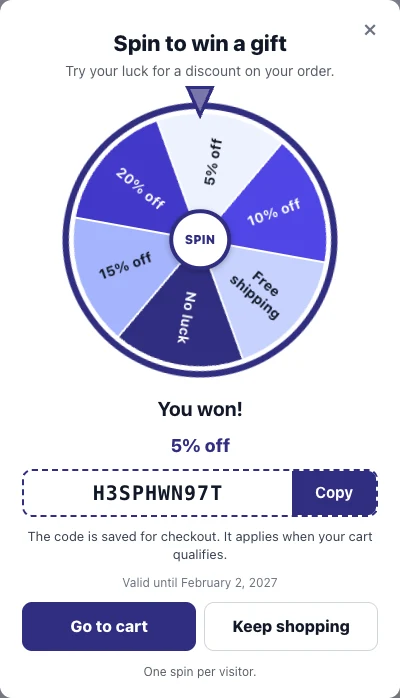
- The result shows You won!, the code, a Copy button and Valid until with the date.
- The wheel adds the code to the shopper's cart:
- "The code is in your cart." The code is applied.
- "The code is saved for checkout. It applies when your cart qualifies." The cart was empty; the code applies once the shopper adds products.
- "We could not add the code to your cart. Copy it and paste it at checkout." The shopper can still copy the code.
Where you find the codes in Shopify
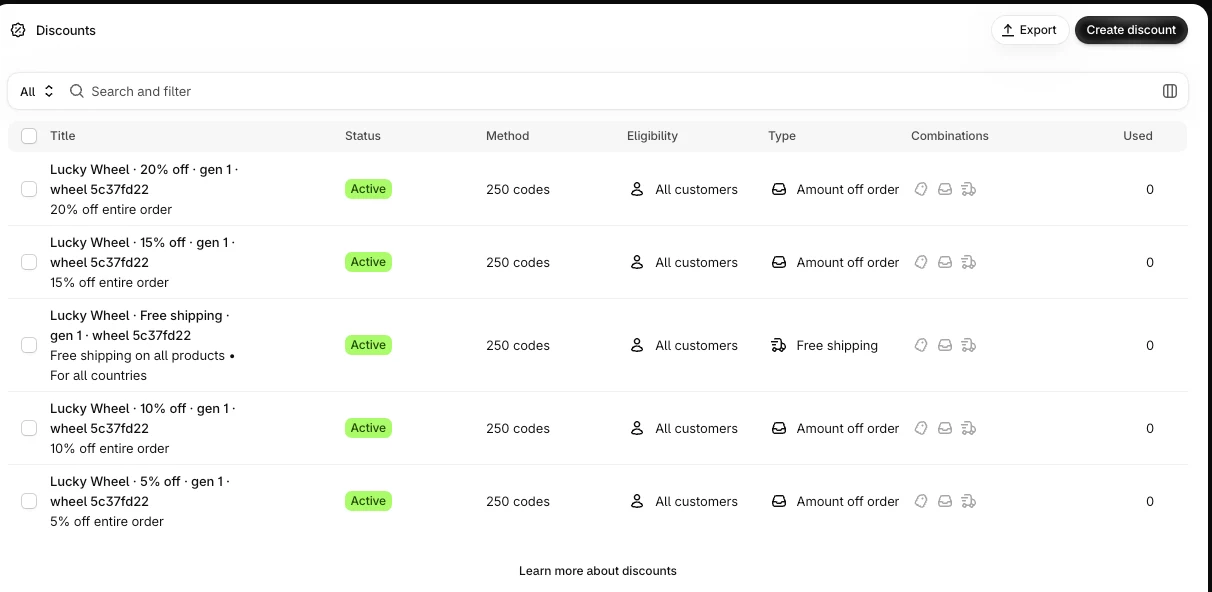
Go to Discounts in your Shopify admin. Each Lucky Wheel discount has a title like this:
Lucky Wheel · 10% off · gen 1 · wheel 1a2b3c4d
- 10% off is the slice label.
- gen 1 is the batch number. Over time the app starts a new batch before the old one ends, so you can see more than one per prize.
- wheel 1a2b3c4d is the start of your wheel's id.
Leave these discounts as they are. The app creates, extends and ends them by itself.
Codes on the customer record
Saving shoppers as customers in your Shopify store is off at launch. It needs Shopify to approve protected customer data (email and phone) for the app, and that is not approved yet. Until it is on, the app does not create or change customers, add tags or write metafields. A winner gets the code on the wheel and in their cart only. The code is not saved on a customer record.
When it is turned on, the app saves the code on the winner's customer record in your store. It adds the tag lucky-wheel-winner and saves the prize, the code and its end date in the customer's lucky_wheel metafields. Your other tags stay as they are.
Phone numbers
If your wheel asks for a phone number, the shopper types it with + and the country code, for example +44 7911 123456. The wheel shows "+ country code and number" in the field. Spaces and brackets are fine. A number without + and a country code is not accepted.
The server checks the number against the numbering plan of its country. A number that does not exist gets "This phone number does not exist. Check the country code and the number." under the phone field, and the shopper does not spin until they fix it.
Check that it works
- In the editor, click Test a win to see the result screen. Test spins show a sample code only.
- To test a real code, spin on your storefront with your own email in a private window, then use the code at checkout.
Common errors
| What you see | Why |
|---|---|
| The code does not apply at checkout | The code was already used, the order has another discount, or the code's end date has passed. |
| The shopper sees "You have already spun this wheel." | Each shopper can spin once per wheel. A second spin with the same email or phone number is refused, even from a new device or browser. |
| The shopper sees "This phone number does not exist. Check the country code and the number." | The number is not valid in the country its code points to. The shopper fixes the number or the country code. |
FAQ
Can I use my own codes?
No. The app makes the codes for you in your store.
Can I change how long codes last or let them combine with other discounts?
Not in the app today.
What happens to the codes if I uninstall?
The discounts stay in your store until their own end date, and codes already won keep working until then. See Uninstall, your data and privacy requests on Shopify.
Related articles
Did this article answer your question?