Set prizes and chances on Shopify
Each slice of the wheel is a prize or a "no prize". You decide how often each slice wins. The app gives every winner their own discount code, so you do not add codes yourself.
When to use this article
- You are building your wheel and want to set the prizes.
- You want to change how often a prize wins.
Before you start
- Lucky Wheel is installed. See Install Lucky Wheel on your Shopify store.
Steps
- In the app menu, click Wheel.
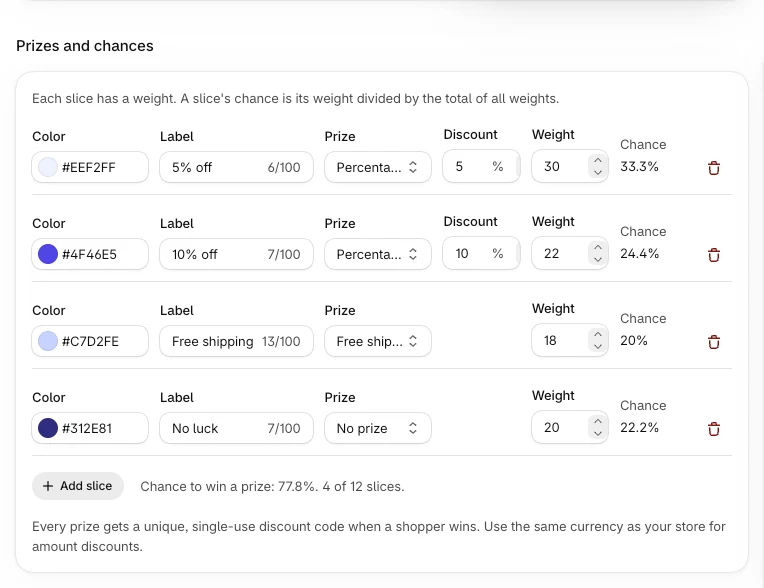
- Go to Prizes and chances.
- For each slice, fill in:
- Label: the text on the slice, for example "10% off". Up to 100 characters.
- Prize: Percentage off, Amount off, Free shipping or No prize.
- Discount (for percentage off): a number from 1 to 100.
- Amount (for amount off): a number above 0. Currency shows your store currency and cannot be changed. Amount discounts are always in your store currency.
- Weight: a whole number, 1 or more. It sets how often the slice wins.
- Color: the slice color.
- Click Add slice to add a slice, or the delete button on a slice to remove it.
- Click Save in the save bar. The save bar shows after your first change.
Rules for slices
- A wheel has 2 to 12 slices.
- At least one slice must be a prize.
- Every slice needs a label.
How chances work
A slice's chance is its weight divided by the total of all weights. The app shows the result as Chance next to each slice.
Example: four slices with weights 30, 30, 10 and 30. The total is 100. The slice with weight 10 wins 10 times in 100 spins on average. The others win 30 times in 100 each.
Under the slices, the app shows the chance to win any prize, and how many slices you have out of 12.
The draw happens on our server with the weights you saved. Shoppers never see the weights or the codes before they win.
Test the result
- In Preview, open Land on and pick a slice, or keep By chance (weights).
- Click Test a win.
Test spins run in the editor only. They show a sample code, never take a real code, and are not counted as spins or leads.
Check that it works
- The app saves without errors and shows "Wheel saved".
- In the preview, each slice shows the label you typed.
Common errors
| Message | What to do |
|---|---|
| Add at least 2 slices. | Add another slice. |
| A wheel can have at most 12 slices. | Remove a slice. |
| At least one slice must be a prize. | Change one slice from No prize to a prize. |
| Enter a discount from 1 to 100. | Fix the percentage. |
| Enter an amount above 0. | Fix the amount. |
| Enter a whole number of 1 or more. | Fix the weight. |
| Your store currency could not be read from Shopify, so prizes with an amount were not saved. Try again in a minute. | Wait a minute and save again. |
FAQ
Can I use my own discount codes?
No. The app creates a code for each winner in your Shopify store. See How discount codes work on Shopify.
What happens if a prize has no code ready at that moment?
The wheel picks another slice. If no slice can be given, nothing is recorded and the shopper can spin again.
Related articles
Did this article answer your question?