Add to cart does not add the product
Usually the customer did not complete a required option. The widget stops the add and shows them a message.
What you see
- The customer clicks the add to cart button, and the page goes back to the widget.
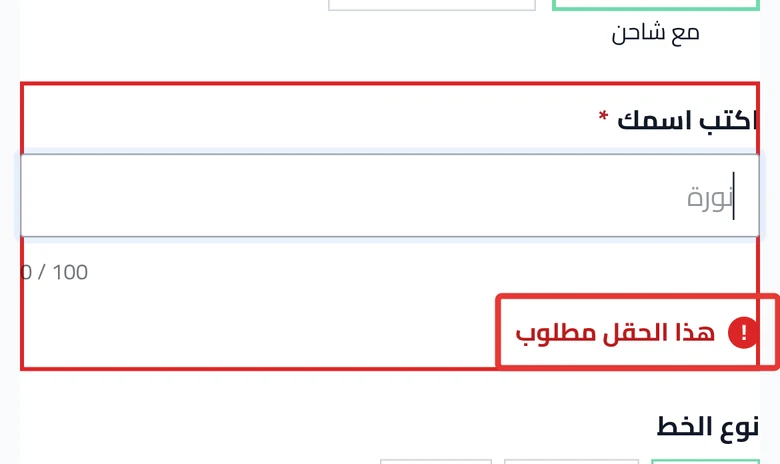
- They see a message such as "Complete the required fields before adding this product to the cart: Name on mug".
- Under the missing option: "This field is required".
- Or a message about their photo: "We couldn't save your photo, so the product wasn't added to the cart."
- Or the button text changes to "Adding..." and then goes back to normal, without adding anything.
Most likely cause
An option has Required turned on, and the customer left it empty.
Fix
1. An empty required option
The customer completes the option named in the message, then clicks the button again. If you do not want this option to block the order, open it in Options, turn off Required, then publish. Required is explained in Option settings in Product Studio. The publishing steps are in Review your product and publish it to your store.
2. The page moves to the missing option
This is on purpose. The page takes the customer to the missing option so they can complete it. You do not need to change anything.
3. An image upload option in Salla
Open the product options in your Salla dashboard. Check whether there is an image upload option set as required. If you find one, click Contact support and tell us.
4. The customer is inside Snapchat or TikTok
Some of these apps do not show the widget. Ask the customer to open the product link in their phone's browser. Details in Customers cannot see customization in Snapchat or TikTok.
Still stuck?
Click Contact support in the Studio, and send us:
- The product page link.
- A screenshot of the message the customer saw.
- Whether the customer tried on a phone or a computer.
Did this article answer your question?